
At some point of time I was quite confused why there would be two
ways to assign permission to users in Project Server and with different
names and settings. These two ways are – “Manage Users” and “Share
Project Web App”.
Have you ever found the difference between the two? You are guessing right… YES there is a difference. You must be aware of the fact that Project Server 2013 has two permission modes, one is the SharePoint Permission Mode and the other is Project Server Permission Mode. By default after installing Project Server 2013 setup, the Project Web App is configured in SharePoint Permission Mode.
In SharePoint Permission Mode, the Security category would be missing from PWA Settings.

The “Share Project Web App” only works when your PWA is configured in
SharePoint Permission Mode. The “Share Project Web App” does not works
in Project Server Permission Mode. What if you want to change your PWA
permission mode from SharePoint Permission Mode to Project Server
Permission Mode, is it possible? Yes it is and the steps are very simple…
Have a look: http://technet.microsoft.com/en-us/library/jj219486.aspx
The Manage Users is available for Project Server Permission Mode. So
when you have changed the permission mode, the Security category in PWA
settings would be available now.
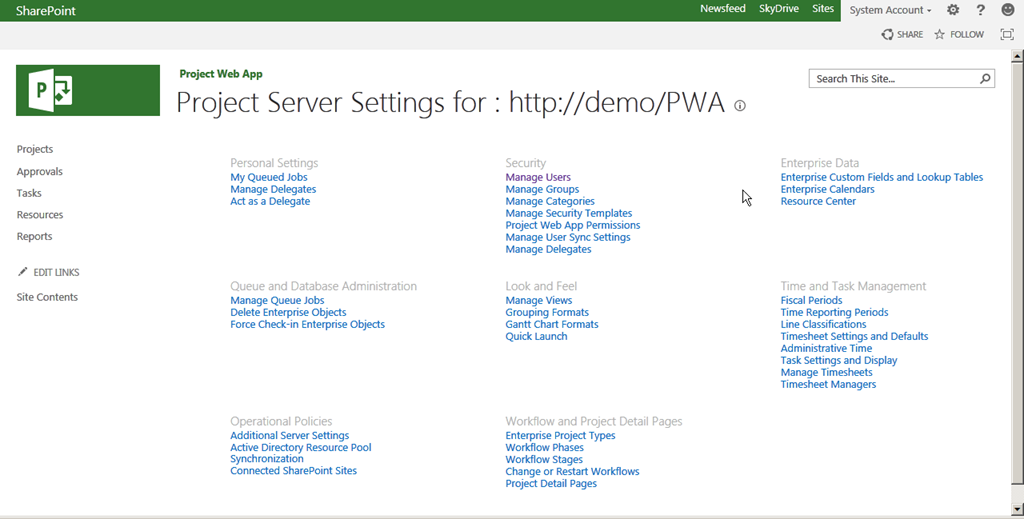
So do remember, when you have configured your PWA in Project Server Permission Mode then you must only use Security category to grant access to users and do not use “Share Project Web App.”
Have you ever found the difference between the two? You are guessing right… YES there is a difference. You must be aware of the fact that Project Server 2013 has two permission modes, one is the SharePoint Permission Mode and the other is Project Server Permission Mode. By default after installing Project Server 2013 setup, the Project Web App is configured in SharePoint Permission Mode.
In SharePoint Permission Mode, the Security category would be missing from PWA Settings.
Have a look: http://technet.microsoft.com/en-us/library/jj219486.aspx
So do remember, when you have configured your PWA in Project Server Permission Mode then you must only use Security category to grant access to users and do not use “Share Project Web App.”


